POS Velocity
Features
PaymentsOperationsCatalog & TaxIndustriesOnline OrderingField ServiceSecurity & TrustDevelopers
ReportsLoginThemeBook a demo

Sell anywhere. Manage everywhere.

A complete point of sale that runs directly on your PAX terminal — not a till wired to a card machine. Restaurants, shops, food trucks and mobile crews sell at the counter, online and on-site, and manage all of it from one back office: one menu, one tax setup, one customer list, one end of day.

1,500+
Terminals live
5,000+
Daily transactions
$10M+
Processed monthly
API
Integration-ready
Book a demoSee a full day →
POSVelocityone engine
PaymentsOnlineField serviceReportsOperationsCatalog & TaxSecurity
Scroll

Built for the businesses that keep a city running.

Chefs preparing food in a busy restaurant kitchen
Restaurants
Bakery counter filled with fresh bread and pastries
Bakeries
Store owner reviewing stock in a clothing boutique
Retail
Food truck parked and serving at night
Food trucks
Field technician working on an electrical meter
Field service
Restaurant dining room with a warm evening atmosphere
Barista standing behind the counter of a coffee shop
Cafés
Smiling owner standing in her coffee shop
Chef grilling at a busy restaurant kitchen line
Kitchens
Small business owner holding a We're Open sign
Independent shops
Tradesperson in hi-vis smiling while talking to a customer
Mobile crews
People lined up in front of a food truck
Street food
Bread and pastries on bakery shelves
Guests inside a busy eatery
  • Native PAX payments
  • Online ordering
  • Work orders
  • Tip prompts
  • Live KPIs
  • Batch reconciliation
  • Multi-rate tax
  • Offline queue
  • Payment links
  • Clock in / out
  • Receipt designer
  • Floor plans & tables
  • Live map
  • GraphQL API
  • Kiosk mode
  • ECR terminal control
  • Native PAX payments
  • Online ordering
  • Work orders
  • Tip prompts
  • Live KPIs
  • Batch reconciliation
  • Multi-rate tax
  • Offline queue
  • Payment links
  • Clock in / out
  • Receipt designer
  • Floor plans & tables
  • Live map
  • GraphQL API
  • Kiosk mode
  • ECR terminal control

POS Velocity is not a card machine with a till bolted on. It is one platform we design, build and run ourselves — the app on the terminal, the cloud behind it, the back office and the API.

POS Velocity Ltd. · TorontoSince 2018Canada & United States
Every kind of counter

Built for how you actually run it.

Six ways merchants use the same platform — each one with its own tools, all of them writing to one ledger.

Keep scrolling
Chefs preparing food in a busy restaurant kitchenRestaurants

Modifiers, tables and tips — built in.

Modifier groups, table service with floor plans and shared open checks, and tip prompts at checkout.

  • Modifier groups
  • Floor plans
  • Tip prompts
Explore →
Barista standing behind the counter of a coffee shopCafés & quick service

Tap, tip and on to the next order.

Tip prompts on the terminal, modifiers for every drink, and live sales in the back office.

  • Tip prompts
  • Modifiers
  • Live KPIs
Explore →
Store owner reviewing stock in a clothing boutiqueRetail

Barcode, units, multi-location.

Native barcode scanning, per-site products and prices, and catalog sync to every terminal.

  • Barcode
  • Per-site prices
  • Catalog sync
Explore →
Food truck parked and serving at nightFood trucks

GPS, offline queue, mobile internet.

Terminal location, service zones, and an offline queue for cash sales.

  • GPS
  • Service zones
  • Offline queue
Explore →
Field technician working on an electrical meterField service

Work orders, agenda, signed completion.

Schedule jobs, dispatch to a terminal, and capture payment plus a signature on-site.

  • Work orders
  • Photos
  • On-site payment
Explore →
Two developers working on code in a bright officeSEMI · ECR

Your POS out front. Our terminal for the cards.

Drive the terminal from any POS, ERP, or app over the ECR API.

  • ECR API
  • API keys
  • OpenAPI
Explore →
01 / 07Swipe →

Every channel writes to one ledger.

See how a typical merchant day moves from opening and the first sale to tips, batch close, and the day's totals.

Illustrative merchant day · 25-second replay
07:00·Open Shop
07:00

Open Shop

An example opening workflow: the terminal comes online, location services start, the first employee clocks in, and the catalog is available.

Terminal online · A920 ProGPS service startedMaria clocked in (Manager)Catalog synced · 142 items
READY · 07:00
PAX A920 PRO
08:30

First Sale

A card is presented, an authorization response is recorded, and the completed sale appears in the transaction history.

12:30

Lunch Rush

During a busy period, the dashboard summarizes sales, order count, average ticket, and tips as transactions are recorded.

16:00

Tips

Tips collected are totalled per employee and shift on the time clock and the shift printout.

21:30

Batch Close

At close, an example batch is prepared, sent to the configured payment host, and updated with the returned status.

22:00

Day Totals

Daily Sales summarizes the day's sales, refunds, voids, tax, and tips for review, and Transactions exports any range to Excel.

Four surfaces. One order book.

Counter, online, field, and connected sales share the same product, tax, customer, and reporting data — reducing duplicate setup and manual reconciliation.

01 / 04

At the counter

Card, contactless, and cash payments — on PAX terminals or a desktop POS Station.
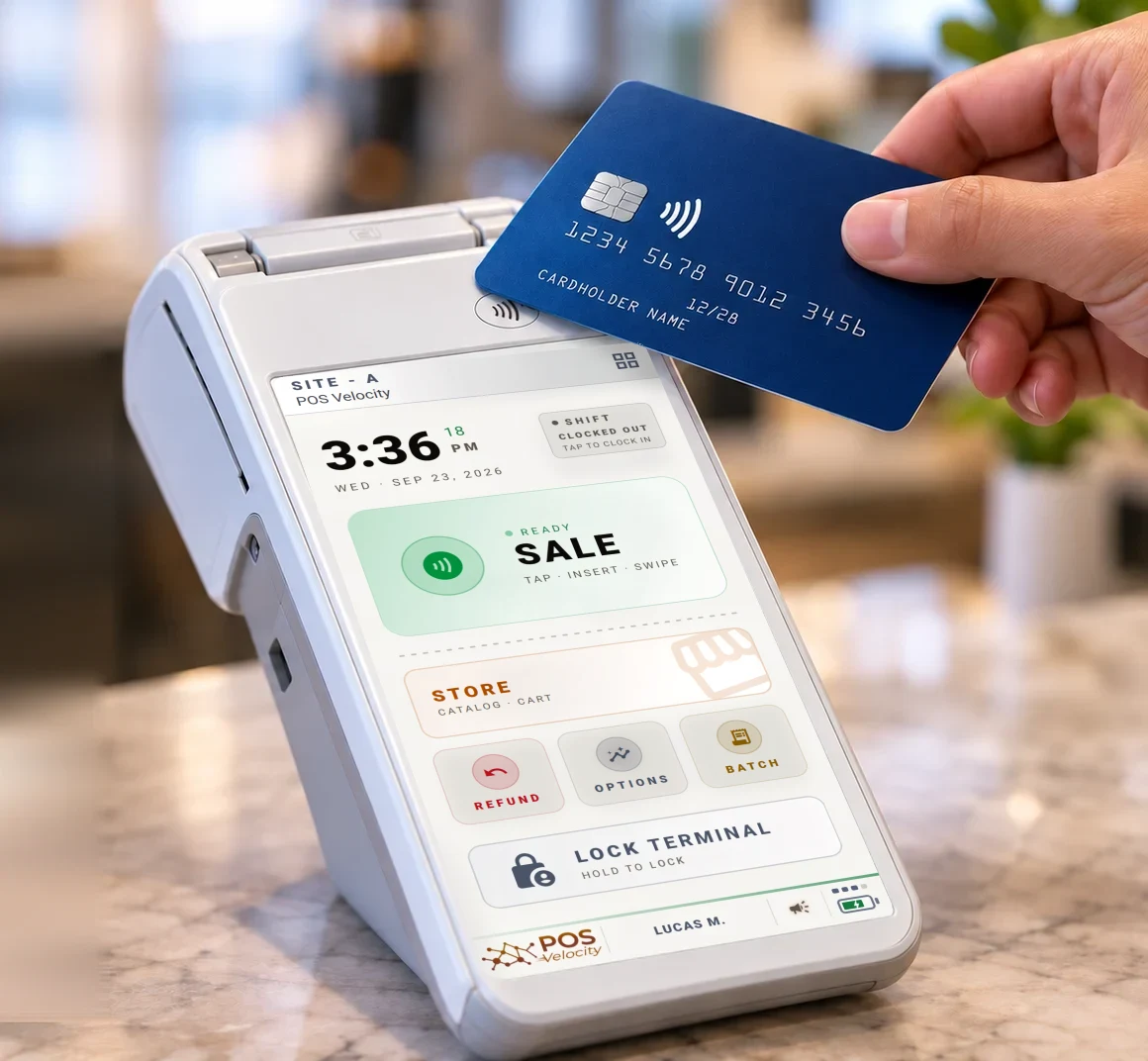
  • PAX A-series + desktop Station
  • Manual card entry
  • Payment links & receipts
Explore at the counter →
A card tapped on a PAX terminal running POS Velocity at a shop counter
02 / 04

Online

Customers order from your own site, using the same catalog, tax settings, and reporting as in-store sales.

  • Embeddable storefront
  • Per-site ordering
  • Orders in your back office
Explore online →
Business owner working on a laptop in a cafeNew
03 / 04

In the field

Work orders, appointments and on-site payment — with photos, fiscal invoices and customer records.

  • Scheduling & agenda
  • Photo attachments
  • Sequenced invoices
Explore in the field →
Tradesperson in hi-vis smiling while talking to a customerNew
04 / 04

Connected

Connect a PAX terminal to an external POS or your own software through the POS Velocity API.

  • SEMI / ECR terminal mode
  • API-key access
  • OpenAPI reference
Explore connected →
Code editor showing application source code

Four layers. All of them ours.

Not a white-labelled app. POS Velocity Ltd. builds and runs every layer — so they are made to fit, not bolted together.

01

The terminal appAndroid · PAX A-series

Our own point-of-sale app runs on the terminal itself — sales, card payments, tips, clock-in and an offline queue, with kiosk controls.

02

The cloud platformOne ledger

Every sale from every counter, storefront and field crew lands in one ledger. Catalog and settings changes roll out to every online terminal automatically.

03

The back officeAny browser

Catalog, tax, staff, sites, terminals and reports in one web portal — with live KPIs, end-of-day reconciliation and role-based permissions.

04

The APIGraphQL · REST · ECR

A GraphQL API, a merchant REST API with an OpenAPI reference, and ECR terminal control — so your own software can read the ledger and drive the terminal.

Built around three practical ideas.

Barista taking a customer's order at the counter
01

One system across every channel

Counter, online, field, and connected sales share product, tax, customer, and reporting data. That means less duplicate setup and fewer manual handoffs.

Owner reviewing the business on a laptop at a wooden table
02

A clear audit trail

Completed sales stay intact. Refunds and corrections are recorded as separate, linked entries, making transaction history easier to review and explain.

People lined up in front of a food truck
03

Designed for day-to-day reliability

POS Velocity is built for PAX hardware, with kiosk controls and offline workflows that can continue through temporary connectivity interruptions.

Our platform. Our code. Our roadmap.

POS Velocity is a Canadian platform, built for merchants in Canada and the US — statutory HST, GST and PST, receipts in English and French, running on PAX terminals merchants already trust.

Book a demoSecurity & trust
Since 2018Toronto · CATerminal · Cloud · APIOne platform

POS Velocity is our own platform — designed, built and operated by POS Velocity Ltd. in Toronto.

Since 2018 our team has worked inside payment processing and point-of-sale software, and saw the same thing at every counter: payments in one system, orders in another, staff on paper and reports in a spreadsheet — with the merchant left to stitch them together.

So we built the whole stack ourselves: the app on the terminal, the cloud behind it, the back office and the API. Payments, orders, staff, customers and reporting share one system, so the pieces fit because they were made to — not bolted together afterwards.

— The POS Velocity team

What merchants ask first.

What is POS Velocity?

POS Velocity is a commerce platform designed, built and operated by POS Velocity Ltd. It runs in-store on PAX payment terminals and desktop, online through a branded storefront, and in the field with work orders — all sharing one catalog, tax engine, customer book, and reporting.

Which PAX terminals does POS Velocity run on?

POS Velocity runs on PAX A-series terminals. Contact us to confirm compatibility for your specific device.

What types of businesses is POS Velocity built for?

POS Velocity supports restaurants, cafés, retail stores, food trucks, and field-service businesses in Canada and the US. SEMI / ECR mode is also available for merchants that keep an existing POS and use the PAX terminal for payments.

Does POS Velocity work in both Canada and the US?

Yes. The platform is built for both countries, with a statutory tax engine covering HST / GST / PST and receipts in English and French.

Do I need third-party apps or add-ons?

Core POS Velocity modules share catalog, tax, customer, and reporting data, reducing duplicate setup and transfers between separate systems.

Do I have to use every feature?

No. Pick the surfaces that fit your business — counter, online, field, or API-connected — and the rest stays out of the way. Everything shares the same core when you're ready to expand.

Does POS Velocity keep working if the internet goes down?

POS Velocity supports offline workflows for temporary connectivity interruptions. Eligible transactions can be queued on the device and submitted when the connection returns, with their status available for review.

Can completed sales be edited after the fact?

Completed sales are preserved rather than overwritten. Refunds and corrections are recorded as separate entries linked to the original transaction, creating a clear audit history.

See it run on your hardware.

Book a 30-minute walkthrough on a PAX terminal and see how the platform fits your operation.

Book a Free Demo →Call (877) 773-1001
30-minute walkthroughReal PAX terminalNo commitment
POS Velocity

Sell anywhere · Manage everywhere

Platform

  • Overview
  • Payments
  • Online ordering
  • Reports
  • Operations
  • Catalog & Tax
  • Security
  • Developers
  • API reference

Solutions

  • Restaurants
  • Retail
  • Food trucks
  • Field service
  • Changelog
  • Request demo
  • Login

Contact

177-1881 Steeles Ave. W.
Toronto, ON, M3H 0A1

Mon – Fri: 9 AM – 5 PM
(877) 773-1001
demo@posvelocity.com

PAX is a trademark of its respective owner.Photography via Unsplash

© 2026 POS Velocity Ltd. POS Velocity is a platform designed, built and operated by POS Velocity Ltd., Toronto. All rights reserved.